Friday, March 12, 2010
Inactive
FYI: This blog is currently inactive. It was for a Photojournalism class that I taught in 08/09.


Thursday, May 28, 2009
Reminder!
Remember that ALL missing/late work that has already been assigned must be turned in by tomorrow (Friday May 28, 2009). (This will not affect any future work that is assigned after tomorrow.)
ALL school cameras must be turned in by tomorrow (Friday May 28, 2009) or else you/your parents will be billed for the cost.
ALL school cameras must be turned in by tomorrow (Friday May 28, 2009) or else you/your parents will be billed for the cost.
Wednesday, May 20, 2009
Project 1976 (Birthyear Photoslideshow)

Sveinn Birkir has been collecting images from 1976 to make a visual anthology of the year he was born. Freaking rad! Now, you are going to do the same, even though you wish your name was Sveinn. Here's what you do:
- Search Flickr or Google Image Search for your birth year and see what comes up. Look for events that happened and things that came out that year (cars, products, albums, movies). Who was on the cover of Time or Rolling Stone? Who died or was born that year? Etcetera…
- After searching, save the photos to your H:// drive.
- Open up MS PowerPoint and create a photoslideshow in PowerPoint by inserting the photos (1 per slide) like you have done before.
- Make sure that the photo takes up the majority or the whole slide.
- Put a caption with each photo.
- You should have at least 15 photoslides in addition to a title slide.
- When finished, upload the PowerPoint to Slideshare and convert it so you can embed it into your blog like last time. (The instructions are in the shared directory.)
- Click here to view the idea.
Tuesday, May 5, 2009

I have created a Twitter account to use for school purposes. Please join Twitter if you haven't already at http://www.twitter.com/. My page is www.twitter.com/srabivens, find me and "follow me". Then, send me an @reply when you've done so. Just type "@srabivens" and then your message to send it to me. This is how you tag people or post to their page specifically. We will use twitter for microblogging back and forth on a more regular basis than our blogs alone. Enjoy! :-)
Wednesday, April 29, 2009
Tuesday, April 14, 2009
End of 3rd Quarter Congratulations'!!!
Congratulations to my photojournalism students who made an A!:
Maria De la Cruz Rodriguez
Michael Hammack
Congratulations to my photojournalism students who made a B!:
Stephany Valero
Keep up the fantastic work you've been doing! Y'all are AWESOME! :-)
Thursday, March 26, 2009
When finished with your work...

- Check the 3rd Quarter Assignments List to the right to make sure that you have everything completed. (Grades are due next week for report cards!!!)
- Then, browse through your classmates' blogs and read/view their work and make positive comments, ask questions, and/or provide constructive criticism.
- Go to Magnum Photos in Motion and view some of the photoessays. (http://inmotion.magnumphotos.com/essays)
- Then, post a summary/response to the ones you liked/disliked and provide links to them.
Friday, February 27, 2009
Tuesday, February 3, 2009
Welcome to 2nd Semester! YAY!
Welcome to East Millbrooks' "Picture My World" IB Elective Course!
This course is an introduction to photojournalism. By the end of this class you should be able to take, scan, edit and use digital pictures, write effective photoessays, and create a physical and/or electronic photojournal (through a blog). You should also gain an appreciation for photojournalism and its role in the community and world.
I am EXTREMELY excited about this course and hope that you too will share in my enthusiasm for the class and photojournalism! I am confident that you will enjoy your time and learn a lot along the way!
Wednesday, January 14, 2009
Blog Checklist
1. Title
2. Profile Completed (with picture)and at top of sidebar
3. At least 1 widget in sidebar
4. "About me" Post (w/ at least 1 picture)
5. *EC - "When I grow up" Post (w/ at least 1 picture)
6. "Change" essay (w/ at least 1 picture)
7. "Education in Nicaragua" essay (w/ at least 1 picture)
8. "My Vision, My Mission, My Legacy" essay
9. *EC - "The Relationship between Freedom and Responsibility" Essay (w/ at least 1 picture)
10. *EC - Slideshow of your 10 best photos in sidebar
Monday, January 12, 2009
1st Semester Final Project

Objective: You are to create a post and slideshow for your post that encompasses you, your vision, your mission, and your legacy as well as discuss the relationship between freedom and responsibility. This will cover the short-term and the long-term. To do this, you must do some soul searching, reflection, brainstorming, and critical thinking. Please take this seriously, spend quality time on it, and think of it as you attempting to make a map for your life and what you want it to be. This assignment will be what you make of it.
Directions for Classroom:
1. Brainstorm your take on ““My Vision, My Mission, My Legacy” and then write a paper (at least 5 paragraphs)
a. My Vision for My Life (where do you see your life taking you?, how are you going to get there?, what are you going to do if things happen unexpectedly?)
b. My Mission (goal) in Life (what do you want to do/accomplish in your life?)
c. My Legacy (what do you want your kids, grandkids and the people who knew you to remember you by?)
d. Think about how you want to illustrate yourself and your future with words and with photos/images/name brands/items that represent you and what you are about for the blog.
e. Get at least 2 people to peer-edit.
2. *Brainstorm and write about “The Relationship between Freedom and Responsibility” (which is this year’s essential question) and then write a paper (at least 5 paragraphs).
a. Discuss what this quote means in general and/or for other people.
b. Then, more importantly, discuss what this quote means to you and in your life.
c. Think about how you want to illustrate this with words and with pictures for your blog.
d. Get at least 2 people to peer-edit.
Directions for Computer Lab:
1. Open up “Internet Explorer” from the Novell Applications Screen
2. Go to http://www.venice-arts.org , then click on “Student Work”-> “Social Art Initiatives”
3. Read the article and click on various documentary projects to get ideas.
4. Then at the top, click on “Hear it straight from the kids” then click on “See Francesca's Photos and hear her audio story on Yahoo! NEWS” to hear and watch her story (make sure the volume is on!).
5. Go to www.blogger.com. Sign in.
6. Create “New Post” entitled “My Vision, My Mission, My Legacy” and post final draft.
7. Create a movie with photos pertaining to your vision, your mission, and your legacy (that represent you) to insert in the post. (If you were not allowed to use the cameras, then you need to collect some of your favorite photos from the internet and save them to your H:// drive.)
8. Create a photo slideshow of your best photos taken from class for the sidebar. (If you were not allowed to use the cameras, then you need to collect some of your favorite photos from the internet and save them to your H:// drive.)
9. *Create “New Post” entitled “The Relationship between Freedom and Responsibility” and post final draft.
10. If you finish early, explore stories and student work on http://www.venice-arts.org.

Saturday, January 3, 2009
Happy New Year!

I hope that everyone had a wonderful break/vacation and is ready to get back to work to finish out the semester! Please keep in mind that the semester ends January 23.
Yay for Cameras!
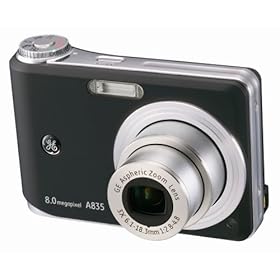
I am excited to announce that we we finally have digital cameras to use! They must be coded and labeled by the media center and then they will be released to us to use. Equipment contracts will need to be completed and returned before a student can use any of the equipment. Please keep in mind that you must have a grade of C or higher, great behavior, and be responsible to be able to use the photojournalism equipment. I thank you as first semester photojournalism students for your patience and understanding through the initial stages of this NEW course! You have been great guinea pigs! Now, hopefully you all will be able to have more to show for what you have done and learned in this class!
Monday, November 10, 2008
Congratulations to my students who made A's and B's for 1st Quarter!!!

Students who made A's in my class:
Kiemera Ansley
Javon Arlee
Dre Fortune
Randy Hoffman
Zoe Phinazee
Ali Then
Hannah Trudeau
Alex Watkins
Students who made B's in my class:
Nick Armstrong
Bryant Brown
Crystal Carrington
Alexis Cooper
Shy Debnam
Zahid Naimee
Lisa Park
Chris Paul
Danesha Poteat
Ryan Schultz
Kendall Sheffield
Shabria Whitaker
1st Quarter Assignments

This is a list of the 1st Quarter Assignments:
1. Parent/Student Info. Form
2. Pink Photo/Video Permission Form
3. Teacher Letter WU
4. Photojournalism Survey
5. Essay on Chosen Photo (out of the 11 on board)
6. Look for "Associated Press" articles and look for articles/photos that GRAB your attention, WHY do they?
7. Choose a picture that is important to YOU, bring it in, write AT LEAST paragraph describing what is in the photo and WHY it is important to YOU.
8. "Snapshot" of a Famous Photojournalist
9. Newspaper Article Preferences
10. Photoslideshow in PowerPoint
11. Newspaper in Publisher
12. Personal Blog
Friday, October 17, 2008
No computer lab for a while

We will not be able to go to the computer lab for a while due to computer testing in both computer labs. If you were absent for any of the days in the computer lab and you were unable to finish any of the technology projects, please see me. I will arrange for you to finish your projects using the computers in my room.
Please also remember that the end of the quarter is drawing near. All missing/late work MUST be turned in before the end of the quarter, Friday Oct. 31. NO EXCEPTIONS! Also, please remember that you if you do not have a grade of C or better and good behavior, you will not be able to use the digital cameras when they arrive!
Wednesday, October 15, 2008
Unit 8 - Creating a Blog
Each student will be responsible for creating his/her own blog (website) to upload their photos and essays to and share with the class. All blogs will be linked from the class website on the toolbar to the right. Blogs can be edited and accessed from any location. Anyone can see your blog, but only you can edit it. See rubric for grading guidelines and remember to keep everything G-rated. As always, if you have questions or issues email me at tbivens@wcpss.net or see me in class.
Creating a Blog Rubric
Creating a Blog Rubric
Tuesday, September 30, 2008
Unit 7 - Creating a Newspaper in Microsoft Publisher

In this unit, we will be creating personal newspapers with articles and photos and the best layout/design will be used for the classroom newspaper. We will discuss the proper techniques of creating a newspaper, writing an article, and cover news basics.
Creating a Newspaper Rubric
Unit 7 - Create a Slideshow in Microsoft PowerPoint

This unit will discuss the PowerPoint program and how it can be used to create a photoslideshow. Each student will create a photoslideshow with a title slide and at least 5 photo slides. Each photoslide will have a small caption/blurb and the photo is to take up the majority of the slide. Each slide will have a transition and sound. This will be preparation for when personal photos are taken and displayed.
Creating a Photo Slideshow in MS PowerPoint
Subscribe to:
Posts (Atom)